
AI Harness Is the System Around the Agent
tl;dr: a good AI harness gives agents context, constraints, proof, and a way to find the human when it matters.
Hey,
People talk a lot about AI models, prompts, and agents. But when you use agents for real work, the agent itself is only one part of the system.
The useful thing is what I call the AI harness: everything around the agent that gives it the right context, limits the bad choices, proves its work, and makes sure the result reaches a human when it matters.
A model without a harness is like a very fast developer who joins a company without knowing the repository, the quality bar, who owns a decision, how deployment works, or how to find anyone after finishing. It can still produce something. But you will spend a lot of time fixing the missing system around it.
The default I changed three days ago
Three days ago, I changed my Codex default to gpt-5.6-terra with medium reasoning and normal speed. Today, I have used only that setup since then.
Everything is ok so far. Actually, it is better than using Sol with extra high or whatever maximum setting and watching it think for longer, then do something stupid anyway hehe.
This is not a benchmark. Three days does not prove that Terra is universally better than Sol. It proves something more useful for my daily work: more thinking is not the same as better work when the agent has weak instructions around it.
At the beginning, Terra Medium sometimes stopped halfway through a task and asked me to do a small substep that it could clearly do itself. Open a page. Continue a normal flow. Run the obvious check. I was paying for an agent and then becoming its intern.
So two days ago I changed the general Codex instructions. The rule is now explicit: when I ask for an outcome, that authorizes the ordinary steps needed to get there. The agent should inspect the available tools, recover normal browser state, retry a transient failure, choose the reasonable reversible option, and continue. It should only stop for a real blocker: a missing credential or MFA, a legal or financial commitment, destructive irreversible work outside the request, an unavailable dependency, or a material decision I did not make.
That small instruction change made a bigger difference than raising the reasoning level. Terra Medium now works through the boring parts instead of making me do them, and I can still ask for deeper reasoning when the problem actually deserves it.
That is a harness problem, not only a model problem.
Ronald Pereira said the same thing in our Amigos da Quave WhatsApp group: he increasingly values better rules, skills, and tools around agents more than the intelligence of the model itself. A simpler model with a good harness can beat, or at least match, a more complex one with the same harness.
He also sent me this old chart from a 2024 DeepLearning.AI post about agent workflows. It is still a good visual for the point.
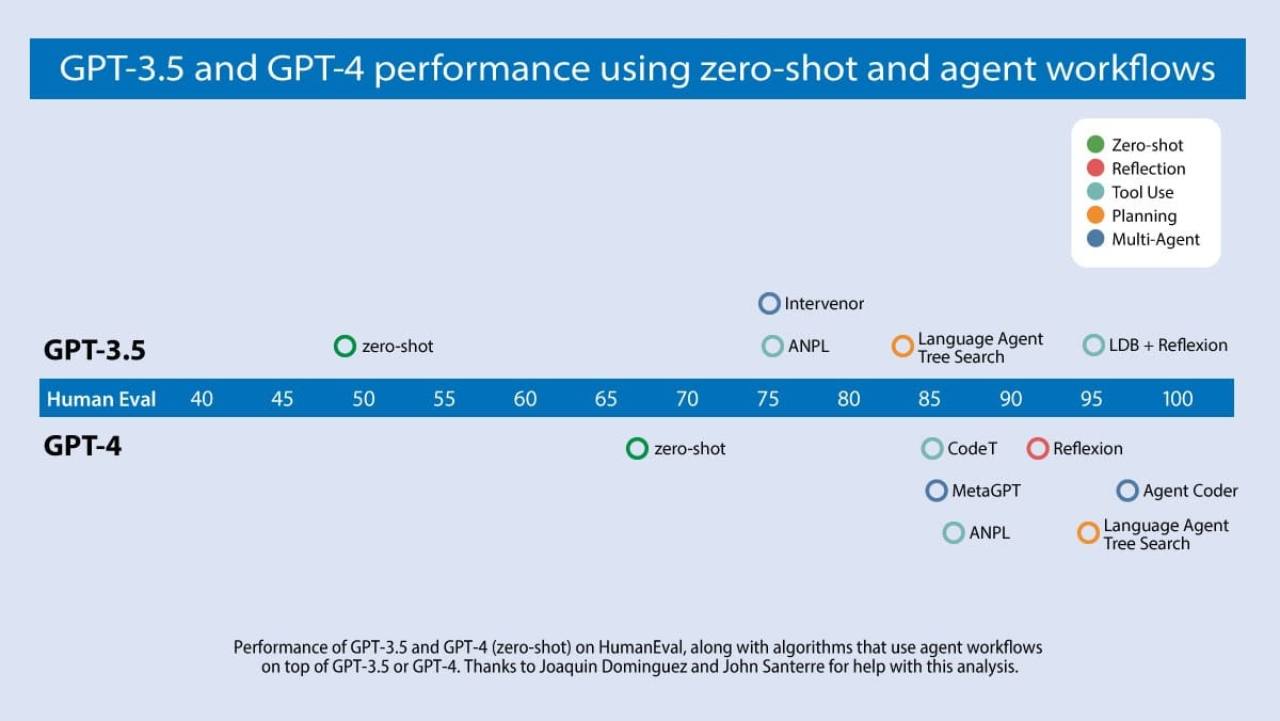
Chart shared by Ronald Pereira in Amigos da Quave. Source: DeepLearning.AI, 2024.
Most model comparisons are zero-shot comparisons. They measure raw intelligence: give the model one prompt and see what happens. But that is not how I use an agent to run real work. What matters is its agentic capacity with the repository rules, the skills, the tools, the feedback loop, and the checks around it. Once you put those things around a model, their practical distance is often much smaller than the benchmark names make us imagine.
Before that, my default was gpt-5.5, with xhigh reasoning and Fast mode. This is not a bad setup. It is a great setup if I need a hard problem solved quickly and I do not care much about the cost. But I had made it the default for everything, including simple investigation, editing a small file, checking a log, and explaining to me that it checked a log.
Of course my consumption grew.
The first lesson is very simple: do not pay for your maximum need all day.
Fast mode costs more usage. xhigh gives the model more room to think. Both are useful. Neither should be the automatic choice just because I forgot the configuration was there.
The other thing that helped was finally looking at the rate card instead of guessing from the names. Codex now measures usage in credits by token type. These are the current rates per million tokens for the models I am likely to choose from:
- GPT-5.6 Sol: 125.000 input credits / 1M, 12.500 cached input / 1M, 750.000 output credits / 1M
- GPT-5.6 Terra: 62.500 input credits / 1M, 6.250 cached input / 1M, 375.000 output credits / 1M
- GPT-5.6 Luna: 25.000 input credits / 1M, 2.500 cached input / 1M, 150.000 output credits / 1M
- GPT-5.5: 125.000 input credits / 1M, 12.500 cached input / 1M, 750.000 output credits / 1M
This is not a dollar price list, and it is not a promise that one task costs a fixed number of credits. A task is a mix of input, cached input, and output. But it makes the shape of the decision obvious: output is expensive, caching helps a lot, Terra is half the rate of Sol, and Luna is a much cheaper choice when the job is clear. OpenAI changes these rates and model availability, so check the current Codex rate card before treating this table as permanent.
My new default is gpt-5.6-terra, medium reasoning, normal speed.
model = "gpt-5.6-terra"
model_reasoning_effort = "medium"
No Fast mode by default.
For the last three days, this has been good enough for most work: reading a codebase, making a plan, fixing a bug with tests, reviewing a PR, writing a post like this one.
João Martins (in the same WhatsApp group) asked me if I was even using it to make plans. Yes. I do not use Codex Plan mode, but I have an equivalent skill that turns the work into a GitHub issue. So the agent reads the discussion and the code, writes the context, acceptance criteria, execution checklist, tests, and verification, then opens the issue. That is planning enough for most things, and it is still Terra Medium doing it.
The nicest side effect is that everything is much, much, much faster. I do not think this is some magical property of Terra. I think it is mostly that I stopped using the highest reasoning level on the biggest model and started using medium reasoning. That is probably the real speed gain (without Fast mode on).
When the work is actually hard, risky, or needs deeper thinking, I can ask for more reasoning. When I need the answer quickly, I can use Fast mode on purpose.
The point is not that one model is good and another is bad. The point is that a subscription is still a budget. If you always use the strongest model, the deepest reasoning, and the fastest lane, you are saying that every task is a production incident at 3 AM.
Most tasks are not.
Stop making the agent narrate
The second lesson was a little embarrassing because I wrote the instruction myself.
I wanted visibility, so I made Codex keep telling me what it was doing. Diagnosis. Evidence. Next. Again and again.
This is useful when an agent is about to run a migration, delete data, wait for a deployment, or gets blocked. It is not useful when it is just reading the third file in a folder. Every extra status update is more context, more tokens, more interruption, and sometimes more chance for the agent to start explaining instead of working.
So I changed the rule to this: one short progress update only when a verified diagnosis changes the plan, before a risky or long operation, or when it is blocked.
I still want to know when something changes. I just do not need a flight attendant announcing that the airplane is still flying every two minutes hehe.
A chat tab is not an alarm
But there is one moment where I do not want to depend on a chat tab at all: when the agent is done, or when it needs me.
This is why I use Quave Pager with Codex and every other AI harness I use. A chat window is where the agent talks. It is not where a human necessarily looks. I can have Codex running a migration, Claude Code reviewing something, Cursor working on another repository, Slack open, and a kid asking me to see something in the same five minutes. If one of these agents finishes and writes "done" in a tab, it can wait there for hours.
Quave Pager is the attention layer, not only for agents. I also connect my Google Calendar to it. Pager reads the calendars I choose, keeps the calendar itself in Google, and turns the events into the same normal Pager alarms that reach my devices. That puts an AI finishing a deployment, an agent waiting for a credential, and the meeting I cannot miss in one place built to get my attention, instead of scattering each one across another tab, app, or notification system. Calendar stays the source of truth. Pager owns the moment it needs to find me.
The rule is deliberately boring: normal chat for normal progress, Pager only when the work is done or when the agent is really blocked and needs a decision, credential, device action, or approval. Finished is a regular alarm. Blocked is critical. No pager message for "I read another file". Otherwise I would recreate the same consumption and distraction problem with notifications instead of tokens.
The useful part is that the notification knows which AI did the work. From Codex, it carries the current CODEX_THREAD_ID, so I can reopen the exact Codex conversation on my Mac. Not a random link. The exact work.
Claude Code, Cursor, and the other harnesses follow the same contract: when they are done or really blocked, they tell Pager how to bring me back to the right work. That matters when you have more than one agent running. The hard part is not launching them. It is not losing the result or missing the one thing that actually needs you.
So let agents work quietly, then make the important result find the human.
Shorten the path to live proof
The third lesson was about reducing the full cycle: the time between changing code and knowing the live thing works. Quality gates are where many teams waste most of that time while believing they are being safe.
I had agents running full checks locally and then GitHub Actions running the same lint, tests, and compile again. We spent machine time, agent time, tokens, and my own attention proving the same thing twice.
That is not extra safety. It is duplicate paperwork.
Quick story: When I worked for Toyota, they asked us to test the same thing in two environments that were exactly the same: same code, same database, same hash, same everything. I said no. It was the same test twice and would not add any value.
The Toyota manager told me, "That is what we call a Toyota standard of quality." That ended the conversation there hahahaha, but in the end I convinced them that we did not need the second test.
Back to our conversation: For a small code change, local work should be cheap and focused: inspect the diff, run the closest test when it gives fast feedback, run a syntax or formatting check, reproduce the bug if possible. Then GitHub owns the expensive full gate when the changed paths trigger it: the real lint configuration, the full test suite, the production-like compile, the workflow checks that protect the merge.
But this only works if you actually wait for GitHub. A green local command is not a green pull request. A merged pull request is not a deployment. A deployment is not proof that the live thing works.
For Quave ONE, this week, we made the instructions explicit: agents do not run an expensive local full gate by default when GitHub Actions will run the same gate. They run focused checks when useful, then wait for the relevant GitHub checks. Documentation that does not trigger the application or MCP workflows does not need a fake green application check either.
Tests, a build, a deploy status, an HTTP smoke test, and loading the real UI can all be necessary because they fail differently. Running the same lint locally and in GitHub has one job twice.
A long CI queue is annoying, but the answer is not making every developer and every agent redo CI on their own machine. Make CI selective, parallel, cached, and honest about what it covers. If an agent is debugging one function, give it the smallest meaningful test first. If the full workflow is required, let it run once where it protects the merge.
This also changed how I write agent instructions. Instructions are code. A stale instruction that tells ten agents to run unnecessary commands is a production bug for your development cycle. The same is true when it lets an agent stop at every Continue button or return ordinary work to a human. We changed the shared instructions, skills, and pull request template, then told the team that GitHub checks are now the proof we wait for. Otherwise you fix the work once and leave the factory making the same mistake tomorrow.
The goal is a shorter path from code change to verified live result: clear instructions, real gates, and a way to find the human only when it matters. Then close the laptop and go enjoy your time, your work, and the people you love.
Abraços.