.png&w=96&q=75)
Branch previews, faster automations, MCP OAuth, and build minutes
Create branch previews, connect to MCP with OAuth, run cheaper automations, and see the new build-minute billing rule.
Hey,
This week we shipped branch previews, MCP OAuth and API OAuth, faster automations, Prevent destroy for environments, and build-minute billing.
There were many other internal improvements in this release, but I do not want to make you read an engineering changelog disguised as a blog post. If a change is mostly for us to operate the platform better, good. We should operate the platform better. You do not need five paragraphs about it.
So let's talk about the things you can actually use.
Branch previews
You can now create a temporary environment from a Git branch.
The important word here is temporary.
A preview environment should exist when somebody needs to review a branch, and then it should disappear. It should not become another forgotten staging environment that runs forever because nobody remembers who created it, why it exists, or if deleting it will make someone angry.
Now Quave ONE has branch previews as a real lifecycle, not as a naming convention.
quaveone preview create \
  --app acme-web \
  --from acme-web-staging \
  --branch "$GITHUB_REF_NAME" \
  --ttl-hours 72 \
  --idle-hours 8 \
  --wait \
  --user-token YOURTOKEN
This clones a source environment, deploys the branch, and gives the preview an expiration time.
The preview copies the safe runtime configuration from the source environment, including environment variables, resources, startup command, Function config, Job config, WAF and rate-limit settings, IP allowlist settings, and autoscaling settings.
It does not copy custom domains, notification destinations, deployment history, one-off credentials, preview metadata, or the source environment's Prevent destroy setting. And it does not work for Databases & Services environments, because cloning a database as a branch preview is a different and more dangerous thing.
There is also a cleanup rule that matters a lot: idle cleanup only deletes a preview when Quave ONE has real ingress measurements and every sample says zero traffic. Empty ingress metrics data is not treated as idle. In other words, NoData is not idle. If telemetry is not available, cleanup skips that idle check instead of destroying the environment.
I will repeat that because this is the kind of boring rule that saves real work: no data is not proof that nobody is using it.
Automatic previews from GitHub Actions
You can make this automatic for every pushed branch except your main deployment branches.
Create .github/workflows/quaveone-branch-preview.yml:
name: Quave ONE branch preview

on:
  push:
    branches-ignore:
      - main
      - master
      - production
      - staging

jobs:
  branch-preview:
    runs-on: ubuntu-latest
    container:
      image: quaveone/quaveone-cli:latest
      env:
        QUAVEONE_USER_TOKEN: ${{ secrets.QUAVEONE_USER_TOKEN }}
    steps:
      - name: Create branch preview
        run: |
          quaveone preview create \
            --app "acme-web" \
            --from "acme-web-staging" \
            --branch "$GITHUB_REF_NAME" \
            --ttl-hours 72 \
            --idle-hours 8 \
            --wait
Replace acme-web with your Quave ONE app slug and acme-web-staging with the environment you want to clone.
The workflow uses a user token because preview creation copies source environment configuration and secrets. Store it as QUAVEONE_USER_TOKEN in your GitHub repository secrets.
If you prefer the published Quave ONE deploy action instead of calling the CLI directly, the action now has preview inputs too: preview, from, ttl-hours, idle-hours, prevent-destroy, and delete-on-pr-close.
The full docs are in the CLI branch preview guide and the GitHub Actions guide.
The same preview flow from any shell
GitHub Actions is not special here. The action wraps the same CLI, so you can create a branch preview from a laptop, GitLab, Buildkite, Jenkins, CircleCI, or any runner that can install quaveone.
export QUAVEONE_USER_TOKEN="..."
export QUAVEONE_ACCOUNT="acme"
export QUAVEONE_APP="acme-web"
export QUAVEONE_FROM_ENV="acme-web-staging"

BRANCH_NAME="${GITHUB_REF_NAME:-${CI_COMMIT_REF_NAME:-$(git branch --show-current)}}"
COMMIT_SHA="${GITHUB_SHA:-${CI_COMMIT_SHA:-$(git rev-parse HEAD)}}"

quaveone login --output json > /dev/null
quaveone account set "$QUAVEONE_ACCOUNT"

preview_json="$(quaveone preview create \
  --app "$QUAVEONE_APP" \
  --from "$QUAVEONE_FROM_ENV" \
  --branch "$BRANCH_NAME" \
  --commit-sha "$COMMIT_SHA" \
  --ttl-hours 72 \
  --idle-hours 8 \
  --output json)"

preview_env="$(printf '%s\n' "$preview_json" | jq -r '.cliEnvName')"
preview_url="$(printf '%s\n' "$preview_json" | jq -r '.previewUrl')"

echo "Preview environment: $preview_env"
echo "Preview URL: $preview_url"
If you need all generated URLs, ask the preview environment directly:
quaveone preview show --env "$preview_env" --output json \
  | jq -r '[.branchPreview.previewUrl, (.branchPreview.hosts[]? | .url // (if .host then "https://" + .host else empty end))] | unique[]'
And if your CI needs to publish a table of all active previews for an app:
quaveone preview list \
  --account "$QUAVEONE_ACCOUNT" \
  --app "$QUAVEONE_APP" \
  --output json \
  | jq -r '.branchPreviews[] | [.cliEnvName, .branch, .previewUrl, ((.hosts // []) | map(.url // (if .host then "https://" + .host else empty end)) | unique | join(","))] | @tsv'
The important fields are cliEnvName, which you use later for show, extend, and delete; previewUrl, which is the default full URL; and hosts, which contains the generated hosts/domains.
Prevent destroy is a real lock now
Branch previews also forced us to make deletion safety more explicit.
You can now enable Prevent destroy on an app environment. When it is on, Quave ONE blocks that environment from being destroyed, and it also blocks parent app or account deletion if that delete would destroy the protected environment.
This is not just a UI warning.
The REST API, MCP tools, app deletion, account deletion, and preview deletion all hit the same protection. For MCP, changing Prevent destroy uses a dedicated critical scope, quave:admin:destroy-protection, instead of being hidden under a generic dangerous-write permission.
A delete button should be easy when you mean it, but it should be very hard when a production environment is protected on purpose.
MCP OAuth and Connected apps
Last week I wrote about MCP keys and by-tool authorization. This week the bigger shape is live: MCP can connect with OAuth.
If your MCP client supports remote MCP OAuth, you should not need to create a key and paste it somewhere. You add the Quave ONE MCP endpoint, the client starts OAuth, Quave ONE shows you the consent screen, and the client receives its own scoped token.
The endpoint is:
https://mcp.quave.cloud/
Quave ONE uses OAuth 2.1 with PKCE. We also support trusted Dynamic Client Registration, so supported clients like Claude and Cursor can register during the OAuth flow without you pasting a client ID. The callback set has to match a trusted profile exactly. That is intentional.
On the consent screen, you choose one server-enforced mode:
- By permissions, for stable Quave ONE capability scopes like read-only, deploy, config, secrets, dangerous operations, MCP-key management, or admin operations.
- By tools, for an explicit list of MCP tools.
These are not decorative labels. They decide what the server exposes and what the server allows to run.
After the connection, you can open User Menu > MCP > Connected apps to see what is connected, which callback origin it used, which mode it has, when it connected, and when it was last used. You can reduce access or revoke the app there. To add more access or change modes, reconnect and approve a new consent.
There is another small rule here that I care about: MCP OAuth and Public API OAuth are separate resources. An MCP token opens MCP. A Public API token opens the Public API. If an integration needs both, it gets both grants and both appear in Connected apps.
This is the difference between "AI can do anything because it is convenient" and "AI can do exactly what I approved, and I can remove it later".
The docs are here: Connect to Quave ONE MCP.
Automations got faster and cheaper
There is another practical side of the MCP work.
If an automation only needs five tools, the model should not pay the time, token, and cost tax of reading more than 120 tool schemas before it starts thinking.
So Quave ONE automations now use focused and lazy MCP tool loading.
The automation starts with a small selected tool set based on the prompt and context. If it needs more, it can discover and load additional authorized tools during the run. Authorization still comes from the MCP key or OAuth grant. Lazy loading is not a security boundary. It is a way to stop wasting context on tools the automation will not use.
We also cache the observed tool-selection decisions per automation, so the first run can spend a little more learning what it normally needs, and later runs can start with a better guess.
The impact was not theoretical. In one real automation, the newest run used 16.5K input tokens. Previous comparable runs were around 96K to 200K input tokens. In the detailed view, a comparable run went from about $0.0600 to $0.0100. Around 5x cheaper in that case, with fewer wasted tokens and less waiting.
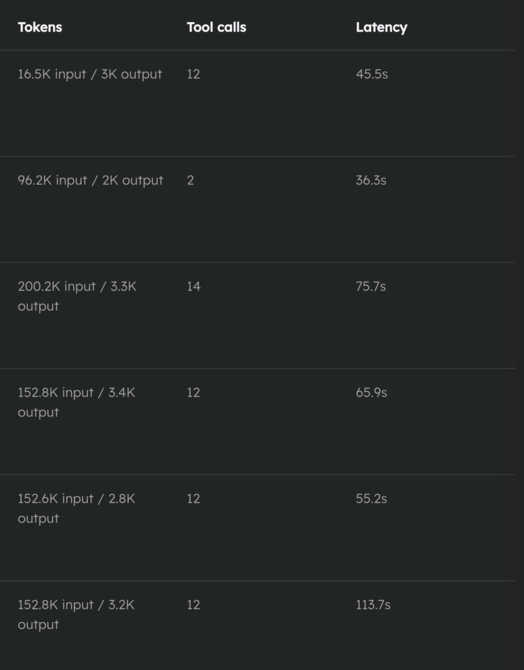
Previous comparable run:

Optimized run:

This is the kind of optimization I like because it is invisible when it works.
The automation has the same goal. The trigger does not change. The prompt does not need to become clever. It just stops carrying a huge backpack of tools on every step.
Build minutes are now part of billing
Now the billing change.
Every Quave ONE account includes 600 build minutes per month. If the account uses more than 600 build minutes in a month, the extra time is charged per minute.
The current price is $0.01 per extra build minute.
This is new.
We are doing it this way because build capacity is real infrastructure. When one account runs a lot of builds, especially long builds, it uses machines, cache, CPU, memory, network, storage, and queue time. That cost should not be hidden inside the base price for everyone forever.
But the rule should also be simple enough that you can calculate it without asking us.
If your account uses 650 build minutes in a month, the extra part is 50 minutes:
50 extra minutes x $0.01 = $0.50
If your account uses 900 build minutes, the extra part is 300 minutes:
300 extra minutes x $0.01 = $3.00
Most accounts will not pay anything. The included 600 minutes are there so normal usage stays normal, and the charge only starts when the account goes above that monthly included amount.
Starting with the August 2026 billing cycle, when build overage applies, it appears as a separate Build usage line under Plans & billing > Usage. We show it as build minutes, not as some strange internal unit, because minutes are the thing you can reason about.
July 2026 is internal preview only for this new build-minute charge. It is not charged to customers. August 2026 is the first charged month.
I want billing to be boring, visible, and explainable. If something costs money, you should be able to see the math before the invoice arrives. The exact rule is in the Pricing details.
Small domain cleanup
One small website note: quave.one is now the canonical public domain for Quave ONE.
The old public domains redirect there with permanent redirects while preserving path and query. Operational hosts and docs hosts stay separate where they should.
Simple rule: public website pages should have one canonical home.
To wrap up
If you only try one thing from this release, try branch previews.
Create a preview from a real staging environment, give it a 72-hour TTL, add an 8-hour idle cleanup window, and stop keeping temporary environments alive forever just because deleting them feels risky.
If you use MCP, connect one client with OAuth and then open Connected apps to see exactly what it received. If you run automations, check the run history and see if the new token shape is showing up for you. If your builds are heavy, read the build-minute billing rule before August starts.
Temporary environments should expire. OAuth grants should be revocable. Automations should not waste tokens on unused tools. Protected environments should be hard to delete. Billing should show the math.
Have a great week and go enjoy the people you love.
Abraços,
Filipe