.png&w=96&q=75)
Storage charges start in July + Easier Compliance
See every storage charge, review access through MCP, and find configuration changes faster.
Hey,
The storage limits for Quave ONE managed databases are not new. They were already in our rules and pricing, but we never charged for overages, so several customers have been using more than the included limit without paying anything extra.
We absorbed this cost for years. For one customer the amount can look small, but when we group the disk and backups of every customer, it becomes a relevant cost for us, so starting with the July 2026 billing month we will charge for storage above the included limits. July usage will appear on the invoice sent in August.
We did not charge this for June or any previous month.
The limits, directly
For Quave ONE Direct managed databases:
- Disk: each zCloud includes 5 GB of allocated disk.
- Backups: each app environment includes 30 GB of backups in each region.
- Extra disk: $0.06 per GB-month.
- Extra backups: $0.05 per GB-month.
We measure the extra storage every hour and average it across the month. You only pay for the average extra amount, not the largest number we saw once.
One real example
Imagine a production database with three replicas using 4 zClouds each. That is 12 zClouds in total, so it includes:
12 zClouds × 5 GB = 60 GB of disk
If the database is configured with 100 GB of disk for the whole month, the extra disk is 40 GB:
40 GB × $0.06 = $2.40
Now imagine this environment keeps 200 GB of backups. The first 30 GB is included, so the extra backup storage is 170 GB:
170 GB × $0.05 = $8.50
The total storage overage for that month is $10.90.
If the database only stayed at these sizes for half of the month, the monthly average would be half and the charge would be around $5.45.
That is the complete math.
You can see the math in Quave ONE
We added the disk and backup storage lines directly to Manage → Plans & billing → Usage. You can see the average extra GB and the amount charged for each database environment, without waiting for the invoice or trying to reproduce our calculation.
This is a screenshot from a real managed database in production, with the customer and database names blurred:
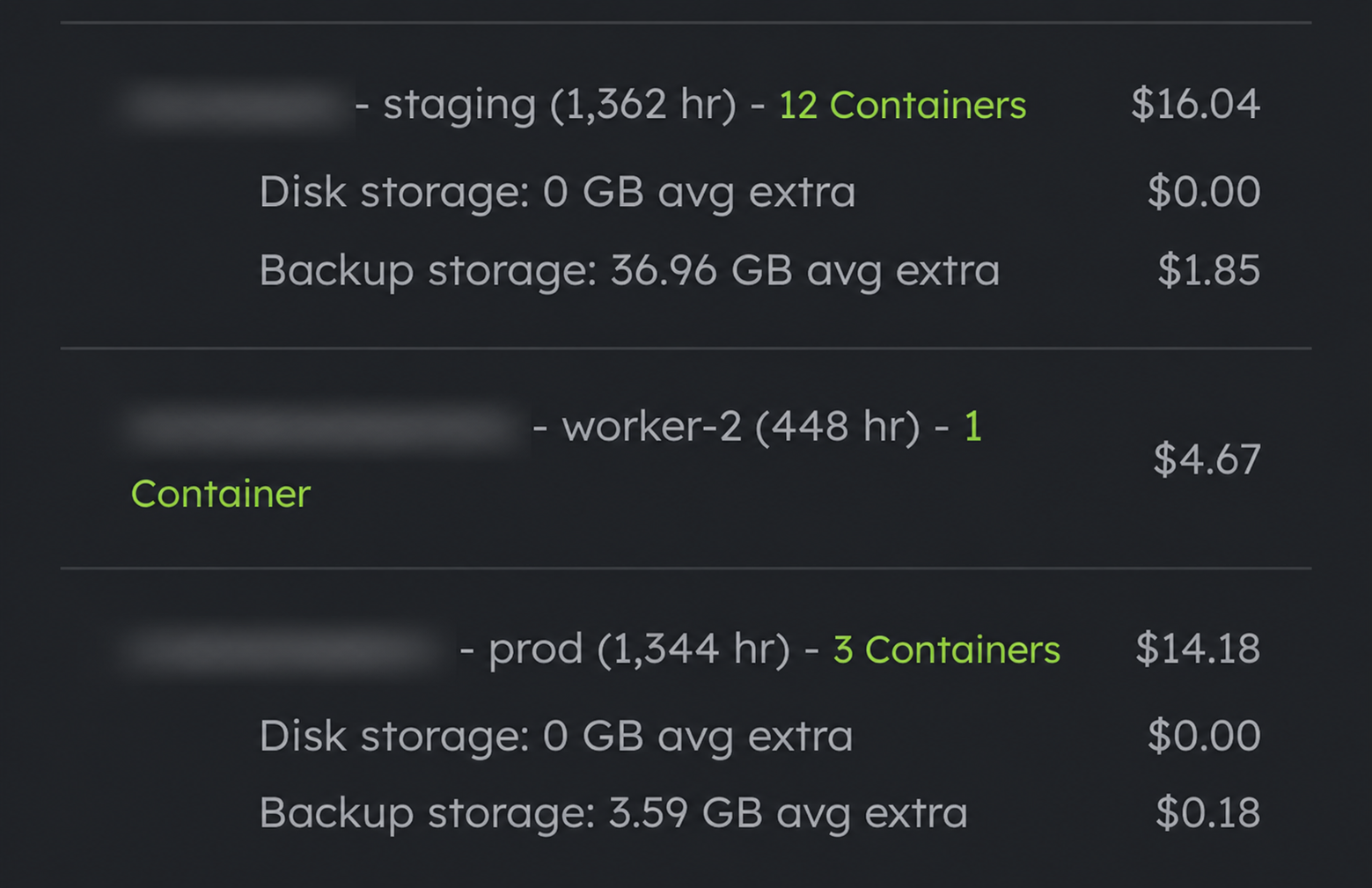
The screenshot is from July 10, so the values are still growing with the hourly average until the month closes.
You can read the exact rules and prices in our storage pricing documentation, and our usage documentation explains where these amounts appear in Quave ONE and how we calculate the monthly usage.
What is not charged
This does not apply to normal app containers, Shared Storage, or backups stored in your own object-storage account. If your backups go to your own bucket, Quave ONE does not charge for that backup storage, your object-storage provider does.
Most customers will pay nothing or only a few cents. Customers running large databases or retaining hundreds of GBs in backups will now pay for the extra storage they use, which is the fair way to keep the base price the same for everyone else.
Open Plans & billing → Usage and check your July numbers. If something does not make sense, reply to this email and we will inspect it with you.
Easier Compliance
Storage is the main subject today, but we also shipped a group of changes that make compliance work easier.
Review account access through MCP
You can now ask the Quave ONE Agent, Cursor, Claude, or Codex:
- "List every account member, role, pending invitation, MFA status, and environment access."
- "Show the account audit events from the last seven days."
The new list-members and list-account-events tools return the same access and audit data enforced by Quave ONE. This means you can run a quarterly SOC 2 or ISO 27001 access review from one conversation instead of opening every member and environment by hand.
The account still needs the correct MANAGE_MEMBERS or AUDIT permission, and the MCP key needs the quave:read scope. The agent cannot bypass any of that. You can see the examples and permission rules in the MCP Platform Access Review documentation.
Find what changed in each version
The environment History tab now shows a summary of the changes in every version, separated into environment variables, build settings, and deploy settings. You can see the count without opening the version, then open it for the exact diff.
There is also a new Only versions with changes filter. If an environment has hundreds of deploys and you need to know when a variable, build setting, or deploy setting changed, you no longer need to inspect every version.
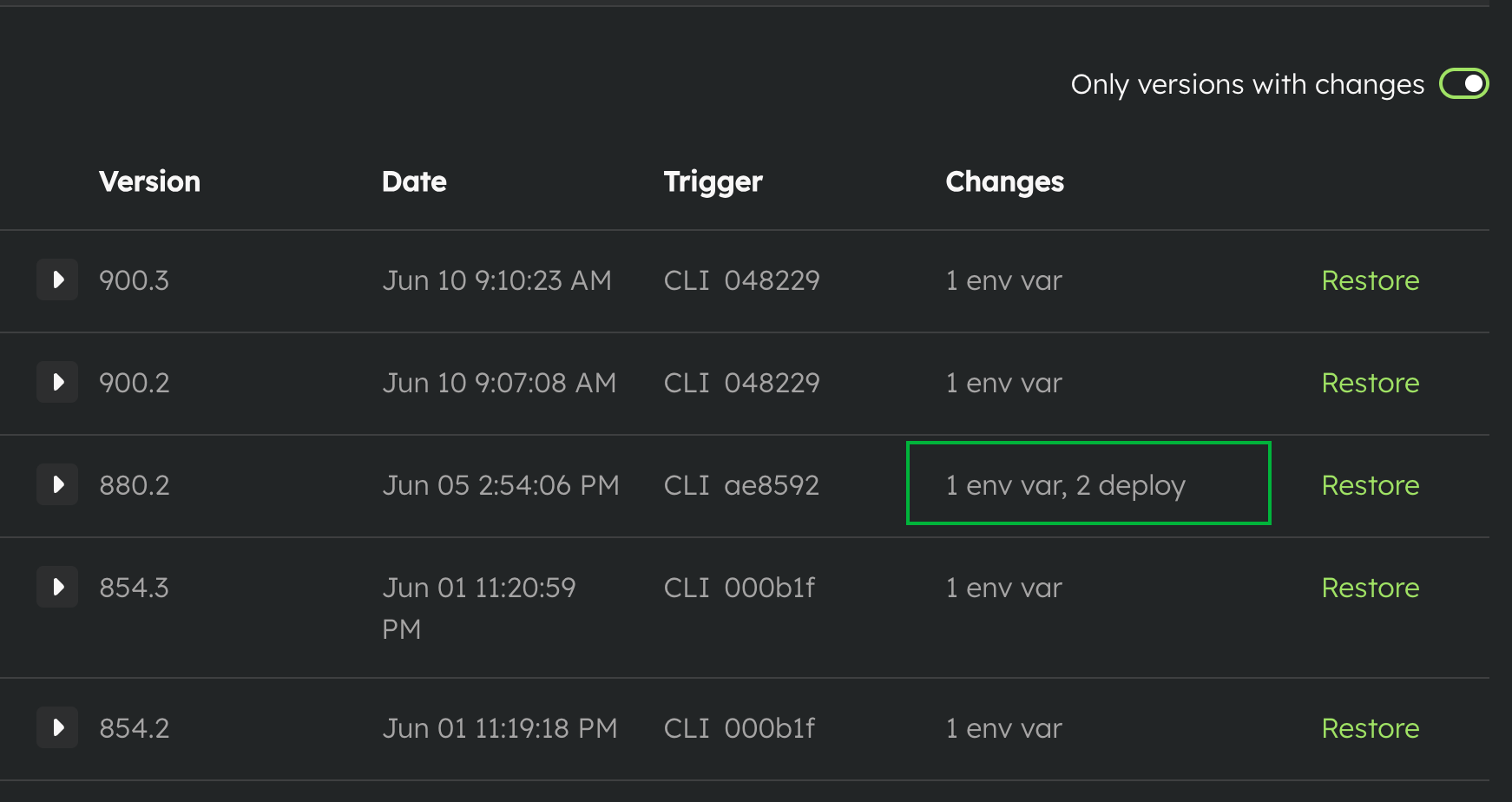
Open one version and you get the detailed changes, grouped by environment variables, build settings, and deploy settings:
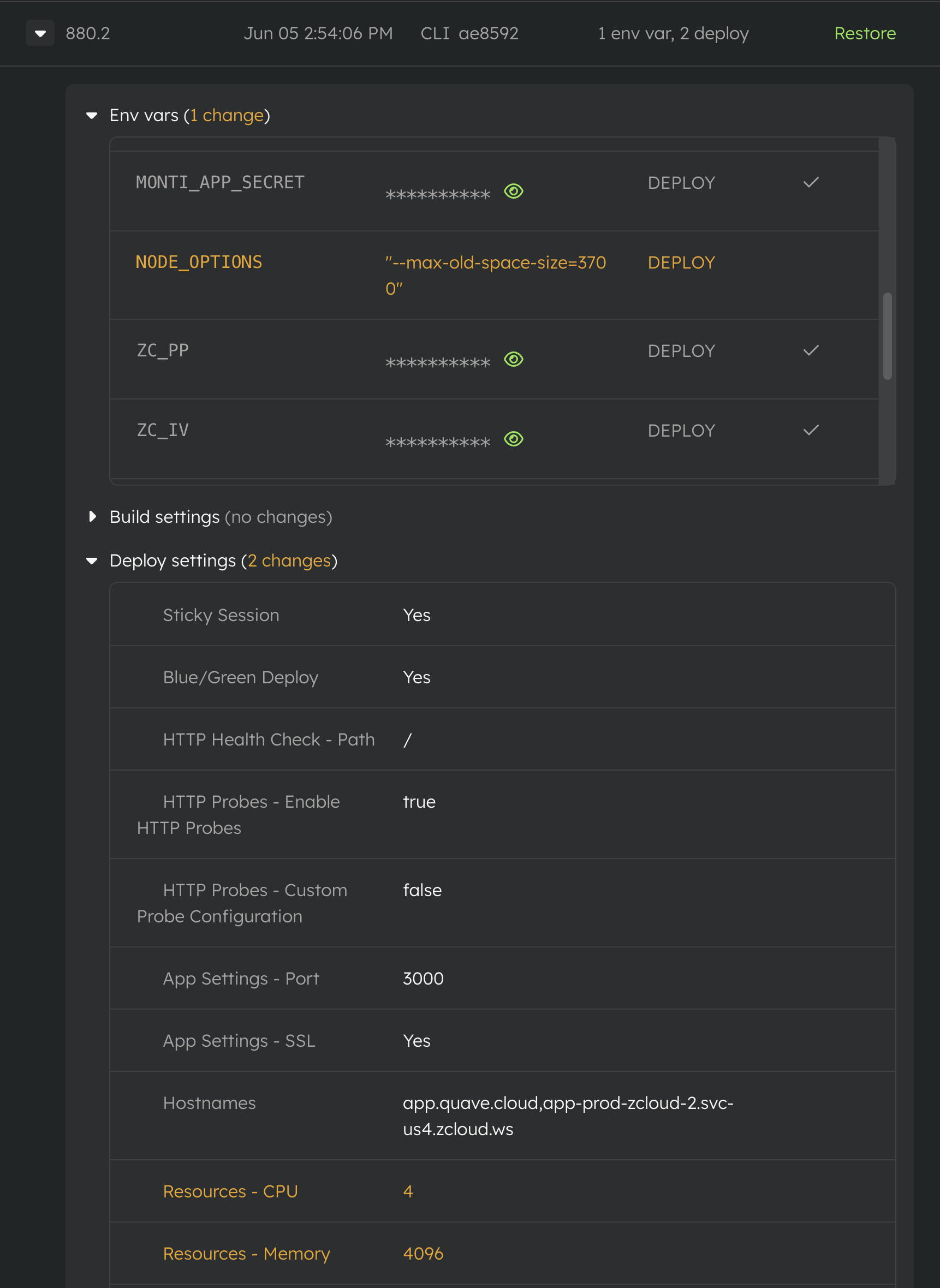
This is useful during an incident, but it is also useful during an audit: who changed the environment, when, and exactly what changed.
MFA enforcement now follows up by email
We announced two-factor authentication last week, but one small part shipped after that announcement: when an admin requires MFA for the account, members who are not covered yet receive an email telling them what they need to do.
They can still sign in and complete setup without an admin manually unlocking them, but now the follow-up does not depend on someone remembering to message every person.
Billing should be boring, direct, and visible. Compliance should be boring too. These changes move both in that direction.
Have a great week and enjoy the people you love.
Abraços,
Filipe